3D Playground and Toy Illustration Set: A Practical Guide for Designers and Educators
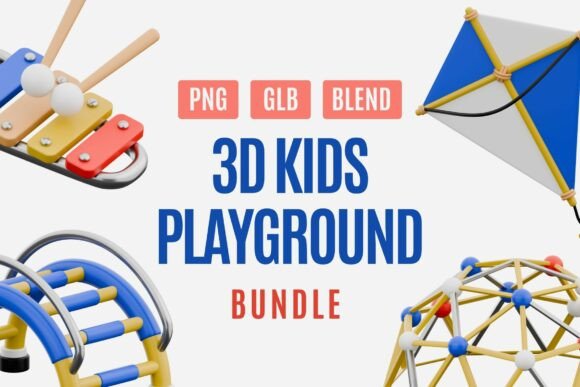
Bringing the joy of playtime into digital designs requires more than just bright colors; it demands assets that communicate safety, fun, and imagination simultaneously. The 3D Playground and Toy Illustration Set offers a curated collection of twenty unique elements, ranging from classic slides and swings to trampolines and bicycles. For designers, educators, and content creators, this bundle represents a significant time-saver, but only if utilized with an understanding of its technical capabilities and aesthetic limitations. Many users rush into integrating 3D assets without considering format compatibility or visual consistency, leading to disjointed final products. This guide explores how to maximize the value of these illustrations while avoiding common pitfalls that compromise quality and efficiency.
Understanding the Asset Versatility
Before diving into design work, it is crucial to recognize what this specific bundle offers. Unlike flat vector graphics, these assets are crafted with soft textures and a joyful 3D style, available in PNG, GLB, and BLEND formats. This multi-format approach is not merely a bonus; it is a necessity for modern cross-platform workflows. However, a frequent misunderstanding occurs when users treat all formats as interchangeable without adjusting their workflow accordingly.
The PNG files provide transparent backgrounds, making them ideal for quick drag-and-drop applications in tools like Canva or PowerPoint. The GLB and BLEND files, conversely, allow for full 3D manipulation in software such as Blender, Figma, or specialized animation suites. Ignoring the distinction between these formats often results in designers attempting to edit raster images when they should be manipulating 3D models, or vice versa. This mismatch leads to pixelation, loss of detail, and unnecessary rework.
Common Mistakes in Color and Composition
One of the most appealing features of this set is its bright, cheerful color palette dominated by blue, yellow, and red. While these primary tones evoke childhood nostalgia, they can easily overwhelm a design if not balanced correctly. A common error among beginners is using multiple high-saturation elements from the bundle in a single composition without adequate negative space. This creates visual noise rather than a friendly, clean look.
To avoid this, consider the context of your project. If you are designing educational materials for young children, the vibrancy is appropriate, but ensure that text remains legible against the busy backgrounds. For corporate presentations or app interfaces aimed at parents, use the 3D elements as subtle accents rather than focal points. Another overlooked detail is lighting consistency. Since these are 3D renders, they have inherent light sources. Placing a shadow-heavy swing next to a flatly lit sandbox can break the illusion of depth. Always check the direction of highlights and shadows when combining different objects from the set.
Technical Compatibility and Workflow Errors
Many users download the bundle expecting immediate usability in any software, only to encounter friction during the import process. For instance, while the PNGs are universally compatible, the GLB and BLEND files require specific knowledge of 3D environments. A frequent mistake is attempting to open BLEND files in non-Blender software without proper conversion, leading to corrupted data or missing textures.
Furthermore, some marketers and small business owners overlook resolution requirements. Although the assets are high-resolution, scaling a small PNG element to fill a large banner will result in blurriness. Always start with the largest necessary size or, better yet, use the 3D source files to render custom angles and resolutions tailored to your specific output needs. This approach ensures crisp edges and professional quality, whether for print packaging or digital ads.
Strategic Application for Different Audiences
The utility of the 3D Playground and Toy Illustration Set varies significantly depending on the user’s role. Educators might use the images to create engaging classroom visuals, but they often fail to maintain thematic consistency. Mixing these playful 3D elements with stark, realistic photography can create a jarring experience for students. Instead, pair these illustrations with other soft-edged, cartoon-style graphics to maintain a cohesive narrative.
For web developers and app designers, the interactive potential of GLB files is often underutilized. Rather than static images, consider implementing hover effects or simple animations using the 3D models. This adds a layer of interactivity that enhances user engagement. However, be mindful of file sizes. Loading heavy 3D assets on mobile devices can slow down page performance. Optimize your GLB files before deployment to ensure a smooth user experience without sacrificing visual appeal.
Evaluating Quality Before Implementation
Before committing to a full project rollout, conduct a thorough audit of the assets. Check the transparency edges on the PNG files to ensure there are no halos or jagged lines. Inspect the polygon count of the 3D models if you plan to use them in real-time applications. High-poly models may look detailed in renders but can cause lag in interactive web environments.
Additionally, verify the license terms if you are using these assets for commercial client work. While this bundle is designed for flexibility, ensuring you have the right to modify and redistribute the derivatives is essential for professional integrity. Keep organized folders for each format type to streamline your workflow. Labeling files clearly prevents confusion later, especially when working in teams where multiple designers may access the same asset library.
Better Approaches for Creative Success
To truly leverage the potential of this collection, adopt a modular design mindset. Treat each playground element as a building block. Combine a slide with a sandbox to create a custom scene, or isolate a bicycle for a minimalist icon set. Experiment with cropping and framing to highlight specific details, such as the texture of a swing seat or the curvature of a trampoline net.
Moreover, consider the emotional tone you wish to convey. The soft colors and smooth textures are designed to spark happiness. Align your typography and layout choices with this sentiment. Use rounded fonts and ample whitespace to complement the friendly nature of the illustrations. Avoid harsh contrasts or aggressive geometric shapes that clash with the organic, playful vibe of the 3D models.
In conclusion, the 3D Playground and Toy Illustration Set is a powerful resource for anyone looking to inject warmth and creativity into their projects. By avoiding common technical and aesthetic mistakes, you can ensure that your designs remain professional, engaging, and effective. Whether you are creating a children’s book, a toy package, or an educational app, thoughtful integration of these assets will elevate your work and resonate with your audience. Take the time to understand the formats, respect the color palette, and optimize for your specific platform, and you will unlock the full potential of this delightful collection.