Integrating Tree of Life Multilayer Paper Cut Files into Professional Crafting Workflows
In the evolving landscape of digital fabrication and home decor production, the distinction between a simple craft project and a professional-grade product often lies in the quality of the source assets. For creators utilizing laser cutters, CNC routers, or electronic cutting machines like Cricut and Silhouette, the Tree of Life Multilayer Paper Cut Files represent more than just a decorative motif; they are a structured component within a broader manufacturing or creative workflow. Understanding how to effectively integrate these assets into your production pipeline is essential for maintaining consistency, reducing material waste, and ensuring high-quality output.
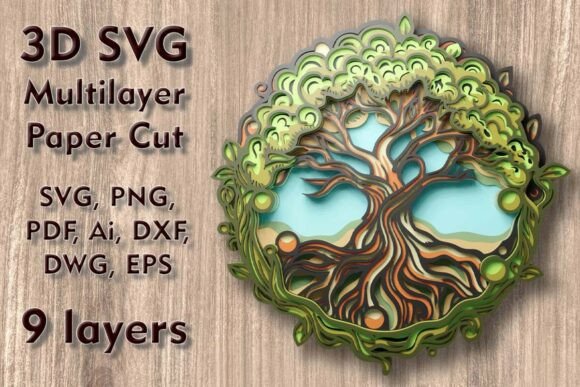
This design, specifically engineered as a 3D multilayered SVG, serves as a foundational asset for creating depth-rich wall art and shadow boxes. With nine distinct layers, it offers a complexity that challenges standard single-layer cutting processes but rewards the operator with a sophisticated final product. The key to leveraging this file successfully is not merely in the cutting, but in the preparation, material selection, and assembly planning that precedes and follows the machine operation.
Pre-Production Planning and File Compatibility
Before any material is loaded into a machine, the digital asset must be vetted for compatibility with your specific hardware. The Tree of Life 3D SVG Multilayer Paper Cut Files are distributed in a comprehensive ZIP folder containing formats such as SVG, layered SVG, DXF, DWG, EPS, AI, PNG, and PDF. This variety ensures that whether you are using vector-based software for a Glowforge laser cutter or raster-based tools for a vinyl plotter, the file can be imported without significant conversion loss.
A critical step in the workflow is verifying the layer separation. Since the design consists of nine separate layers, each corresponding to a different depth plane in the final 3D structure, it is vital to check that your software recognizes these as distinct entities. For users of Adobe Illustrator or Inkscape, the AI and EPS files allow for precise editing of anchor points if minor adjustments are needed. However, caution is advised when modifying the design. The intricate nature of the tree branches and mandala elements means that thin connectors are essential for structural integrity. Reducing the overall size of the design can compromise these delicate elements, leading to breakage during weeding or assembly. Therefore, the standard dimensions of 9.85 inches in height by 9.77 inches in width (250 x 248 mm) should be treated as the baseline minimum for reliable results.
Material Selection and Machine Configuration
The versatility of the Tree of Life Multilayer Paper Cut Files allows for experimentation with various substrates, including plywood, paper, cardstock, MDF, wood, acrylic, cardboard, and even aluminum. Each material interacts differently with cutting tools, requiring specific adjustments in speed, power, and blade type.
- Paper and Cardstock: Ideal for quick prototypes or lightweight wall art. When using Cricut or Silhouette machines, ensure the blade depth is set correctly to avoid cutting through the backing mat. Layering cardstock creates a subtle shadow effect that enhances the 3D illusion.
- Plywood and MDF: These materials are best suited for laser cutters or CNC routers. They provide rigidity and a premium feel suitable for high-end home decor. When cutting wood, focus on edge quality; charring on plywood can be minimized with proper air assist settings on laser machines.
- Acrylic and Aluminum: For a modern, industrial aesthetic, these materials offer durability and a sleek finish. Note that cutting metal requires specialized CNC capabilities, while acrylic can be cut with CO2 lasers but requires careful handling to prevent melting edges.
Selecting the right material is not just an aesthetic choice but a logistical one. Heavier materials like MDF require stronger adhesives and more robust mounting solutions for the final wall installation. Conversely, paper-based projects are lighter and easier to ship if you are selling finished goods online.
Execution: Cutting and Quality Control
During the cutting phase, efficiency is driven by organization. Because the design includes nine layers, nesting the parts efficiently on your material sheet can reduce waste. If you are producing multiple units, consider batch processing. However, maintain strict quality control checks after each cut. Inspect the thinnest elements of the tree branches and the mandala details. Any incomplete cuts or tear-outs should be addressed immediately, either by adjusting machine settings for subsequent runs or by manually repairing minor defects with precision tools.
For laser cutting, the order of operations matters. Cutting inner details before outer contours helps maintain material stability. For electronic cutters, using a brayer to secure cardstock firmly to the mat prevents shifting, which is crucial for maintaining the alignment of the nine layers. Misalignment at this stage can compound during assembly, resulting in a skewed final product.
Assembly and Finishing Techniques
The transition from cut pieces to a cohesive 3D artwork is where the Tree of Life Mundala Svg truly comes to life. Assembly requires patience and precision. Start by identifying the base layer, which typically serves as the background or frame. Work your way up through the nine layers, using spacers or foam tape to create consistent depth between each level. This spacing is what generates the shadow effects that define the 3D aesthetic.
Adhesive selection is critical. For paper and cardstock, acid-free glue sticks or double-sided tape work well to prevent warping. For wood and acrylic, cyanoacrylate (super glue) or epoxy provides a strong bond. Ensure that each layer is perfectly aligned before the adhesive sets. Using a jig or alignment marks printed on the base layer can significantly speed up this process and improve consistency across multiple units.
Once assembled, the piece may require finishing touches. Wooden pieces might benefit from sanding rough edges or applying a sealant. Paper projects can be framed in deep shadow boxes to protect them from dust and humidity. The final presentation should highlight the depth and intricacy of the design, turning a flat digital file into a tangible piece of art.
Long-Term Workflow Integration
Integrating the Tree of Life Multilayer Paper Cut Files into your regular workflow involves more than a one-time project. It establishes a template for handling complex, multilayered designs. Document your settings for each material type—laser power, speed, blade depth, and pressure—so that future projects can be executed with minimal trial and error. This documentation becomes a valuable resource for scaling your production or training team members.
Furthermore, consider how this design fits into your broader product line. The neutral yet intricate nature of the Tree of Life motif appeals to a wide audience, making it suitable for various markets, from spiritual wellness shops to modern home decor stores. By mastering the production of this specific file, you develop skills applicable to other multilayered designs, enhancing your overall capability as a creator.
Ultimately, the value of these files lies in their ability to bridge the gap between digital design and physical creation. By approaching the Tree of Life 3D SVG Multilayer Paper Cut Files with a structured, process-oriented mindset, you ensure that each piece you produce meets high standards of quality and craftsmanship. This attention to detail not only improves the final product but also streamlines your operations, allowing you to focus on creativity and growth rather than troubleshooting preventable errors.